SkyBill Documentation
Important
Draft documentation
This content is a draft version of the SkyBill documentation and is subject to final review. Some information may be incomplete or inaccurate. Features, terminology, and procedures may change before the official release.
SkyBill Utility Billing is a complete meter-to-cash solution for utilities of any size. Built on Microsoft Dynamics 365 Business Central, it integrates billing, customer management, and finance in a single cloud platform.
SkyBill helps utilities:
- Automate the entire billing cycle, from collecting meter readings to sending invoices and receiving payments.
- Support multiple services such as electricity, gas, water, wastewater, district heating, or any other contract-based service.
- Serve diverse customer segments, including residential, small and medium enterprises (SMEs), and industrial/commercial clients.
With SkyBill, you can introduce new tariffs, maintain a single view of customer information, and scale your operations without heavy IT infrastructure.
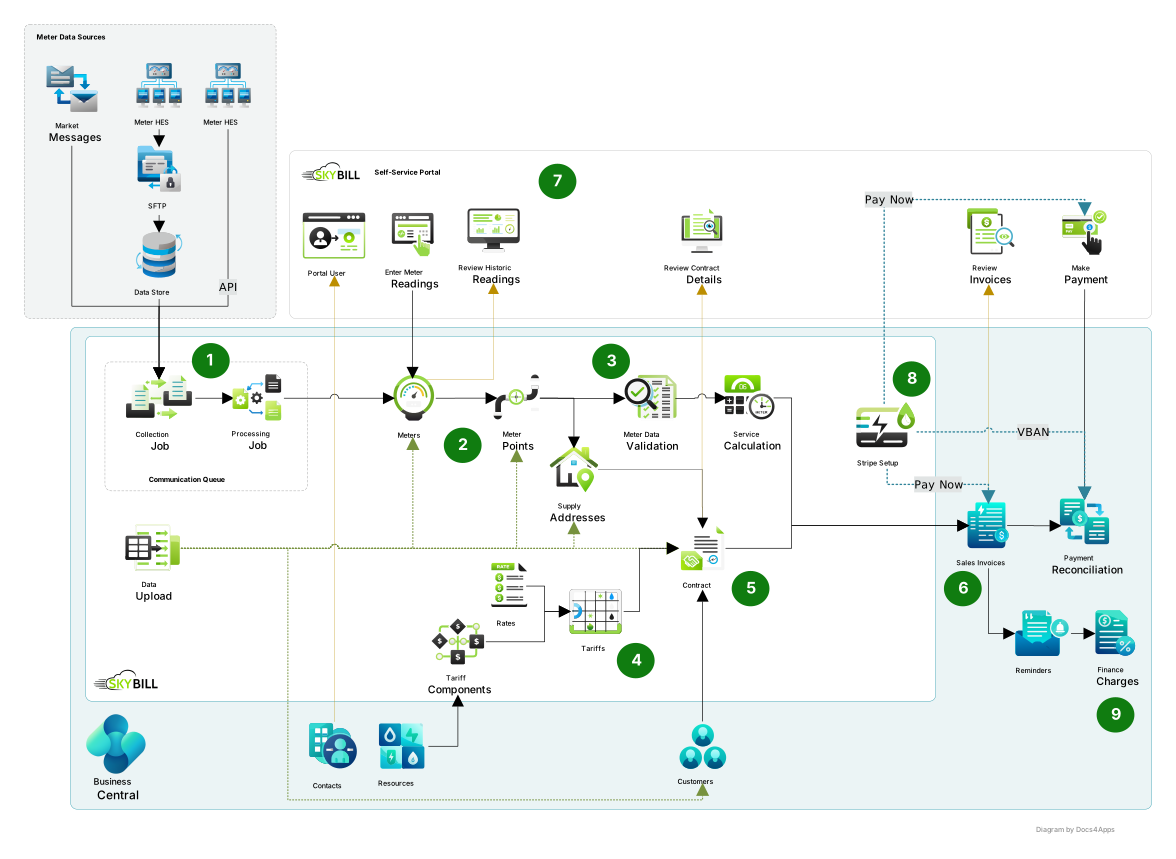
In this diagram:
- Meter readings are collected by external systems and imported to SkyBill.
- SkyBill records meter data by supply address and meter point, and can aggregate the results at the building level.
- The system validates the readings and calculates the consumed services. Both data collection and validation run automatically.
- In parallel to the data collection, you need to set up tariffs. A tariff defines the calculation method and rates for each utility you sell.
- You create the contracts by assigning tariffs to specific customers and their supply addresses.
- Invoices are generated based on the utility contract terms and the calculated services for each billing period. In most cases, this process is fully automated.
- SkyBill includes a self-service portal. Your customers can view their meter readings, utility contract details, and invoices on the portal.
- You can set up Stripe's PayNow option in SkyBill, and make your customers pay invoices directly in the self-service portal or from the invoice.
- In case of overdue payments, SkyBill automatically calculates and applies finance charges and adds them to the invoices.
SkyBill and Business Central documentation
SkyBill is an application that extends standard Dynamics 365 Business Central functionality to meet utilities' needs. You cannot use SkyBill without Dynamics 365 Business Central. The SkyBill documentation builds off of the existing Dynamics 365 Business Central documentation. In most cases, we do not document processes or functionalities that are part of the Dynamics 365 Business Central standard (for example, setting up a customer card). In such cases, we provide a link to the Dynamics 365 Business Central documentation on Microsoft Learn. This way, this documentation concentrates only on functionalities that are part of SkyBill. If you are new to Dynamics 365 Business Central, go to the training and quick starts first. In your everyday work with SkyBill, you will use both standard Business Central and SkyBill-specific functionalities. Green icons in the white sections of the diagram represent the SkyBill-specific functionalities that we document. The blue part of the diagram represents the standard Business Central functionalities, where we mostly provide references to the Microsoft Learn documentation.
Additional resources
Installation
Set up SkyBill
Business functionality
What's new
Business Central training and quick starts
Glossary
Work with Business Central