Time of use pricing
Important
Draft documentation
This content is a draft version of the SkyBill documentation and is subject to final review. Some information may be incomplete or inaccurate. Features, terminology, and procedures may change before the official release.
Time-of-use pricing is a billing method that lets utility companies charge different rates at different times of day, such as day and night. This approach recognizes that the cost of providing utilities varies throughout the day and across seasons. For example, electricity is often more expensive to generate during peak demand hours.
In some cases, utility companies charge different rates based on the time of day or season. For example, in the UK it's common to offer cheaper night-time rates from 12:30 AM to 7:30 AM in winter, and from 1:30 AM to 8:30 AM in summer.
Time of use maps
You can use time of use maps to define different segments of the day and different seasons. Each segment can have its own rate. Later you can use those time of use maps to set up different rates for day and night, or for different seasons.
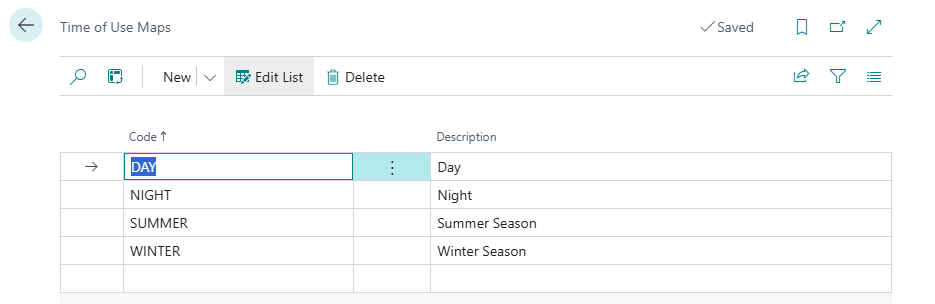
Time of use maps require smart meters that can measure consumption in intervals, for example, every hour or every 15 minutes. Then SkyBill uses the meter reading time series to calculate consumption for the specific segment defined in the list in the Time of Use Map.
To set up time of use pricing
Time of Use pricing allows you to define segments for various types of days, as well as use different season prices and set up individual rates for each segment.
To set up different pricing based on time of day or season, select the tariff line with the Time of use totaling type applied to the tariff component, then select the Time of Use action. On the Time of Usage Map Details list, you can define different segments of the day and different seasons. Each segment can have its own rate.
On the Time of Usage Map Details page, you can define different segments of the day and different seasons. Each segment can have its own rate. You need to specify the following fields for each line:
| Field | Description |
|---|---|
| Map Code | Select one of the maps from the list. |
| Applies-To | Choose one of the options to specify a separate price for a group of supply addresses: Supply Address Landlord to apply the rate to all contracts for a specific landlord, or Supply Address Building to apply the rate to the contracts within a specific building. This provides an additional pricing dimension that lets you assign different rates based on property ownership or location. |
| Applies-to No. | Select the landlord or building depending on your selection in the Applies-To field. SkyBill applies this rate only to contracts associated with the selected landlord or building. If you leave this field blank, SkyBill applies the rate to the tariff line to all contracts, regardless of landlord or building. |
| Rate | Rate applicable to the particular map code. |
Related information
Landlords and tenants
Set up tariffs and pricing rules
Apply step tariffs to utility consumption
Totaling types
Work with Business Central